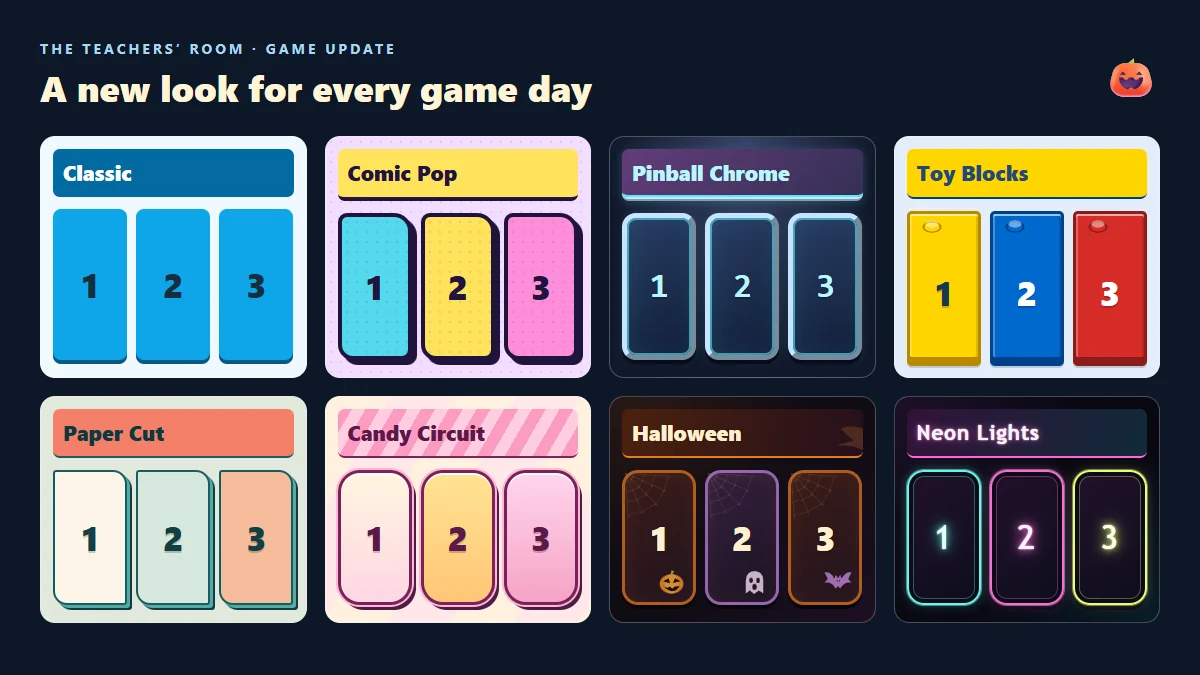
Your classroom games have a new wardrobe. You can now choose from eight visual styles, from the familiar blue and yellow of Classic to glowing Pinball Chrome and a Halloween theme with a few unexpected visitors.
The style changes the look of your game: its panels, question cards, scoreboard, buttons and menus. Your questions, scores and game rules stay the same, so you can give a favourite activity a fresh look without preparing it again.
Find your classroom's favourite look
- Classic: our familiar blue and yellow, with a clear, straightforward layout.
- Comic Pop: bold outlines, bright colours and a comic-book feel.
- Pinball Chrome: metallic borders, dark panels and neon accents for an arcade atmosphere.
- Toy Blocks: colourful building-block panels with little studs and raised edges.
- Paper Cut: layered paper shapes, teal outlines and warm coral details.
- Candy Circuit: pink and cream panels, rounded corners and candy-coloured details.
- Halloween: orange and black, cobwebs, pumpkins, bats and some spooky moving guests.
- Neon Lights: vivid pink, cyan and lime frames, glowing lettering and a neon shop-sign feel against a dark background.
Turn up the colour with Neon Lights
Our newest look swaps metallic edges for colourful light-tube frames. Pink, cyan and lime outlines glow around the panels, while the lettering looks like a brightly lit shop sign. Dark backgrounds keep the questions and scores clear. It is a permanent style you can choose in setup or from the cog menu during a game.
A Halloween cabinet with a few surprises
Halloween goes beyond changing the colours. Shaded spiders crawl across the board with moving legs and cast shadows. Ghosts occasionally pop up, lunge forward and fade away. Drifting fog, watching eyes, passing bats and glowing pumpkins complete the haunted look.
The decorations let clicks pass through to the game controls. The travelling creatures and ghost scares are hidden when your device's reduced-motion setting is enabled, and the effects stop when you switch to another style.
Halloween is a seasonal option, available to choose through 1 November 2026. After that, it will leave the choices for new games. Games already saved with Halloween will keep their chosen look.
How to choose a style
- Open a game and go to its setup screen.
- Find Game style and open the dropdown. Each option includes a small visual preview.
- Choose a look and start playing. New games begin with Classic as the default.
Want to change the atmosphere halfway through a lesson? Open the cog menu during the game and choose another style. You can switch looks without restarting the activity or losing the scores.
Which games can use the styles?
The style picker is available in Trivia, Jeopardy, Pub Quiz, Darts Challenge, Snakes & Ladders, Stop the Fire, Word Wheel, Block Beaters and Plinkemoji. It works on desktop and mobile, with the layout adapting to the screen.
Try a comic look for a lively team quiz, chrome for an arcade challenge, or let the class pick a favourite. For a Halloween lesson, there is a haunted board waiting for you.